Choosing the best FBR digital invoicing software in Pakistan is an important decision for manufacturers, importers, exporters, distributors, wholesalers, retailers and other businesses that need to manage their sales tax invoicing requirements.
Several software providers offer digital invoicing solutions, but not every solution offers the same features, integration capabilities, technical support, security controls or pricing structure.
Some businesses focus primarily on invoice submission, while others need integration with existing accounting software, ERP systems or POS applications. For many businesses, customer support is just as important as the software itself.
Imagine your accounts team is preparing invoices, but an invoice fails validation or the integration stops working. Your business needs a provider that can help identify the issue and guide your team toward a solution without unnecessary delays.
This is why comparing FBR digital invoicing software requires more than checking monthly subscription prices.
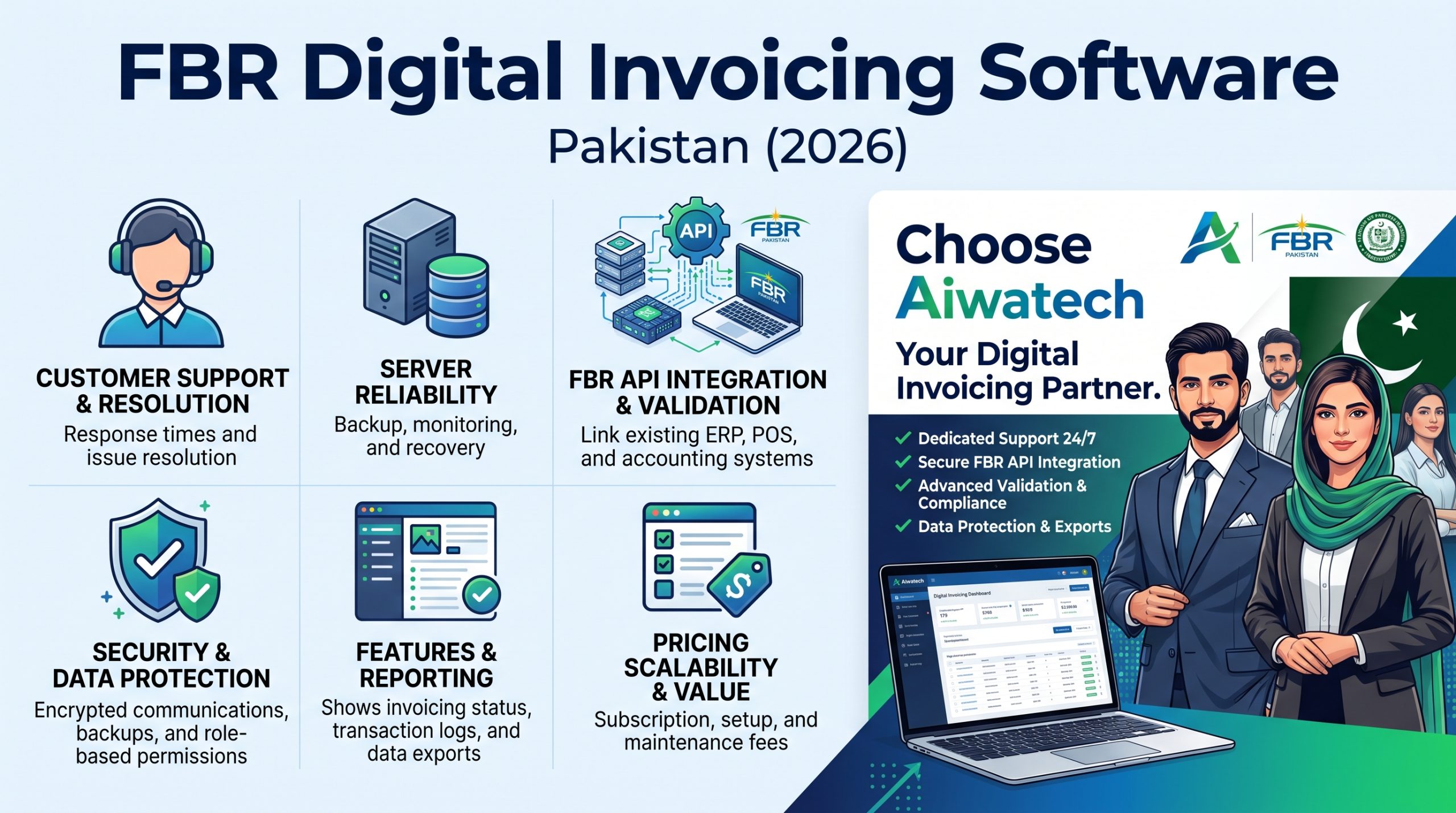
In this guide, we compare the key factors businesses should evaluate when selecting an FBR digital invoicing provider, including customer support, FBR integration, software features, server infrastructure, coding standards, cybersecurity, data protection, API integration and pricing. We also explain why businesses should consider Aiwatech FBR Digital Invoicing when evaluating solutions for their invoicing requirements.
What Is FBR Digital Invoicing Software?
FBR digital invoicing software helps businesses prepare and manage electronic sales tax invoices and transmit invoice information through the applicable integration arrangements with the Federal Board of Revenue (FBR).
Depending on the solution, businesses may be able to create invoices, maintain buyer and product information, validate invoice data, import records from existing software and review submission responses.
For businesses required to integrate under applicable rules and notifications, it is important to verify the relevant requirements and the identity of the entity responsible for the integration.
A software vendor and an FBR-licensed integrator are not necessarily the same organization. Businesses should verify the proposed arrangement against the latest official FBR guidance before choosing a provider.
For official information, visit the Federal Board of Revenue website.
FBR Digital Invoicing Software Comparison: Which Factors Matter Most?
Before choosing a provider, compare the features and services that directly affect your business operations.
| Comparison factor | What to evaluate |
|---|---|
| Customer support | Response time, technical knowledge and issue resolution |
| FBR integration | Applicable integration arrangement and troubleshooting |
| Features | Invoice creation, validation, status tracking and reports |
| Server reliability | Monitoring, backups and recovery arrangements |
| Coding standards | Testing, version control and controlled software updates |
| Security | Authentication, permissions and credential protection |
| Data protection | Data ownership, retention and export options |
| API integration | Compatibility with existing ERP, POS and accounting software |
| Pricing | Subscription, setup, integration and support charges |
| Scalability | Ability to support future business growth |
| Compliance updates | Process for reviewing relevant FBR technical changes |
| Training | User onboarding, documentation and ongoing guidance |
These are comparison criteria, not claims that any particular provider has passed or failed an assessment. Ask each shortlisted company for evidence of its capabilities and service commitments.
1. Customer Support: The Most Important Factor When Comparing Providers
Customer support is one of the most important considerations when choosing FBR digital invoicing software.
A software application can have useful features, but customers may still face difficulties when setting up the system, correcting invoice information, understanding validation errors or connecting their existing software.
When these problems occur, businesses need practical assistance from people who understand both the application and its integration workflow.
What Should Good FBR Invoicing Support Include?
A reliable support service should ideally provide:
- Assistance with initial setup and configuration.
- Guidance on invoice creation and validation errors.
- Help with buyer information, product details and relevant HS codes.
- Troubleshooting for supported integrations.
- Clear communication about technical issues and service interruptions.
- User training and documentation.
- A defined process for escalating urgent issues.
- Follow-up to help ensure reported problems are addressed.
Questions to Ask Before Selecting a Provider
- Is technical support available through WhatsApp, phone, email or a support portal?
- What are the official support hours?
- What response times does the provider commit to?
- Is assistance available for failed invoice submissions?
- Are integration issues covered by the subscription?
- Are there additional charges for technical assistance?
- Who handles urgent issues that affect daily invoicing?
Do not judge support quality solely by the number of contact channels. Look at technical knowledge, accountability, response quality and the provider’s ability to help resolve problems.
Why it matters: When invoicing is essential to your daily operations, responsive technical support can help reduce disruption and unnecessary manual work.
2. Software Features: What Should the Best FBR Invoicing Software Offer?
The right software should simplify invoice management and reduce repetitive work for your accounts team.
Different businesses have different requirements. A small distributor may need straightforward invoice creation and reporting, while a manufacturer may require product-level information, multiple invoice scenarios and integration with an existing ERP.
Essential Features to Compare
Invoice management
- Invoice creation and record management.
- Support for relevant invoice scenarios.
- Invoice data validation before submission.
- Submission status tracking and error visibility.
- Searchable invoice history.
- Appropriate handling of corrections and cancellations.
Buyer and product management
- Buyer information management.
- Product descriptions and HS codes.
- Relevant tax rates and sale-type information.
- Importing buyer and product records where supported.
- Reusable information to reduce repetitive data entry.
Reporting and monitoring
- Invoice history and available submission results.
- Identification of failed or pending transactions.
- Search and filtering options.
- Exportable reports and business records.
- Reconciliation support where available.
Integration capabilities
- Integration with existing ERP, POS or accounting systems.
- Importing invoice information from supported sources.
- Clear validation responses.
- Appropriate handling of temporary failures and duplicate requests.
- Documentation for developers and technical teams.
Before subscribing, request a demonstration using realistic examples from your business. Confirm which features are included in the selected package.
3. Server Standards and Software Reliability
Server infrastructure plays an important role in the reliability of cloud-based FBR digital invoicing software.
Businesses depend on their invoicing applications to access records, prepare invoices and communicate with connected services. Poor infrastructure management can result in slow performance, service interruptions or difficulties accessing important records.
However, simply stating that software is cloud-based does not prove that it is reliable. The provider should be able to explain how the system is monitored, maintained and recovered after a failure.
What Should Businesses Compare?
Server monitoring: Does the provider monitor availability, performance, resource usage and application errors?
Backup arrangements: How often are backups created, how long are they retained and are restoration procedures tested?
Disaster recovery: What procedures are followed if the application or hosting environment becomes unavailable?
Performance: Can the application handle expected invoice volumes and periods of heavy usage?
Maintenance: How are software updates scheduled, tested and deployed?
Hosting transparency: Can the provider explain its hosting arrangements, data location and relevant third-party dependencies?
When comparing FBR digital invoicing providers, ask for clear answers about uptime commitments, backup policies and recovery arrangements rather than relying on general claims about server quality.
4. Coding Standards and Software Development Quality
Software development quality is another important factor, even though customers may not see the underlying code.
Well-maintained software is generally easier to test, troubleshoot, secure and update. Poorly managed development practices can introduce defects, cause integration problems or make it difficult to respond to changes in technical requirements.
Good Software Engineering Practices to Evaluate
- Version control and documented changes.
- Automated or repeatable testing procedures.
- Testing of invoice validation and integration workflows.
- Separate testing and production environments.
- Controlled deployment and rollback procedures.
- Secure management of API keys and application secrets.
- Appropriate error logging and monitoring.
- Regular dependency and security updates.
- Documentation for supported APIs and integrations.
- Performance testing for relevant transaction volumes.
Customers do not need access to a provider’s proprietary source code to evaluate its engineering practices. They can request technical documentation, discuss its testing process and ask how software updates are reviewed before release.
For businesses integrating their own systems, clear API documentation and a structured testing process are especially important.
5. Security: Protecting Business and Tax Information
FBR digital invoicing systems may process commercially sensitive information, including invoice amounts, buyer details, product information, tax calculations and transaction histories.
Security should therefore be a key consideration when comparing software providers.
Security Controls to Evaluate
Encrypted communication: Application and API connections should use appropriate HTTPS and TLS configurations.
Authentication: The system should offer suitable login security and, where appropriate, multi-factor authentication.
User permissions: Access should be restricted according to each user’s responsibilities.
API credential protection: Integration keys and other secrets should not be exposed through public code, unsecured files or ordinary application logs.
Audit trails: Important administrative actions and changes should be recorded where appropriate.
Security updates: The provider should have a process for identifying and addressing software vulnerabilities.
Incident response: Customers should understand how security incidents are investigated and how affected users are notified.
Do not assume that software is secure simply because it uses HTTPS or describes itself as a secure cloud application. Evaluate the controls protecting the application, database, accounts and integration credentials.
6. Data Security, Ownership and Portability
Your business records are valuable. Before choosing an FBR digital invoicing provider, understand how your data is stored, accessed, retained and exported.
Businesses should not become unnecessarily dependent on one software vendor because they cannot retrieve their records or move to another solution.
Important Questions About Data Protection
- Who owns or controls the business data under the service agreement?
- Where is the data hosted?
- Who can access the application and database?
- How are backups protected?
- How long are records retained?
- Can invoices and related business data be exported?
- What happens to data when the subscription ends?
- Are there charges for data export or migration?
- How are third-party service providers involved in processing data?
- What procedures apply if unauthorized access is suspected?
Ask for a sample data export before committing to a long-term subscription. Confirm the available formats, included fields and any limitations.
Also distinguish between records maintained in your invoicing application and records submitted to or maintained by FBR. Exporting your application data does not replace applicable legal record-retention obligations.
A transparent provider should explain these arrangements clearly before the customer signs an agreement.
7. FBR API Integration and Existing ERP or POS Software
Many businesses already use accounting software, ERP platforms, POS systems or custom-built applications.
Replacing an existing system solely to support digital invoicing may introduce unnecessary costs, training requirements and operational disruption.
For these businesses, integration capability can be a deciding factor when comparing FBR digital invoicing providers.
What Should a Proper Integration Process Include?
- System assessment: Understand the existing software and business workflow.
- Field mapping: Map relevant buyer, product, tax and invoice information.
- Validation: Identify data errors before submitting invoices.
- Testing: Test supported invoice scenarios in the appropriate environment.
- Production setup: Configure the applicable integration arrangement for live use.
- Monitoring: Review submission results and investigate failures.
- Maintenance: Address relevant technical changes and maintain compatibility.
Questions to Ask Each Provider
- Can the software integrate with our existing ERP, POS or accounting system?
- Is API access included in the package?
- Is technical documentation available?
- Can existing buyer and product records be imported?
- How are failed requests and duplicate submissions handled?
- Who is responsible for integration maintenance?
- Are there additional implementation or support charges?
A suitable integration should reduce repetitive work while maintaining accurate records and appropriate error handling.
8. Compliance Updates and FBR Technical Changes
FBR requirements, technical documentation and applicable procedures may change over time. Businesses should understand how their software provider monitors relevant changes and determines whether updates are required.
Ask each provider:
- How are relevant FBR technical updates monitored?
- Who determines whether a change affects the customer’s system?
- Are necessary software updates included in the subscription?
- How are changes tested before production release?
- How are customers informed about important updates?
- What assistance is available if a change causes validation errors?
A reliable provider should explain the scope, timing and cost of relevant changes.
Businesses should also remember that software supports invoicing and integration; it does not remove their responsibility to maintain accurate information and comply with applicable tax requirements.
9. Pricing: Compare Total Cost, Not Just the Monthly Subscription
Price is an important consideration for small and medium-sized businesses. However, the cheapest subscription does not necessarily offer the best overall value.
Compare all the costs involved in setting up, operating and maintaining the solution.
| Cost component | What to check |
|---|---|
| Subscription | Monthly or annual charges and included features |
| Setup | Initial configuration fees |
| Integration | API implementation and testing charges |
| Data migration | Charges for importing existing records |
| Training | User onboarding and training costs |
| Technical support | Included support and additional service fees |
| Additional modules | POS, inventory, accounting or other features |
| Maintenance | Software updates and ongoing technical work |
| Data export | Charges for retrieving records or migrating away |
Request a written quotation that separates one-time charges from recurring fees.
A reasonably priced solution can be a good choice if it meets your operational needs, offers suitable support and provides the necessary integration capabilities.
10. Comparing Different Types of FBR Digital Invoicing Providers
Not all providers offer the same type of service. Understanding the difference can help you shortlist the right solutions.
| Provider type | Potential benefits | What to verify |
|---|---|---|
| Dedicated invoicing software | Focused invoice creation, submission and reporting workflows | Features, support, security and integration arrangements |
| ERP or accounting software provider | May integrate invoicing with existing business processes | Compatibility, implementation costs and maintenance |
| POS and inventory provider | May combine billing, stock management and invoicing | Supported FBR workflows and additional module costs |
| Custom software developer | Can tailor integration to specific business requirements | Testing, documentation, security and ongoing support |
| PRAL or another applicable integration service | May provide an integration route under relevant arrangements | Eligibility, service scope and business software requirements |
These categories can overlap. A business may use an existing ERP together with a separate integration service, or choose a dedicated invoicing application.
Before selecting a named provider, verify its current licensing arrangements, actual product capabilities and service terms. Do not assume that every software vendor is itself an FBR-licensed integrator.
11. How to Compare Individual FBR Digital Invoicing Companies
When comparing individual software companies, use the same evaluation criteria for every provider.
The following scorecard provides a practical starting point.
| Evaluation criterion | Suggested weight |
|---|---|
| Customer support and issue resolution | 25% |
| FBR integration and validation | 20% |
| Security and data protection | 15% |
| Server reliability and recovery | 10% |
| Features and reporting | 10% |
| API compatibility and scalability | 10% |
| Pricing transparency | 5% |
| Training and documentation | 5% |
| Total | 100% |
Score each company from 1 to 5 based on evidence, demonstrations, documentation and written service commitments.
For example, a provider’s support score should reflect its response quality, technical assistance and escalation procedures rather than simply the availability of a WhatsApp number.
These weights are a suggested framework, not an official industry ranking. Businesses with complex integration requirements may want to assign more weight to API compatibility, while smaller businesses may prioritize ease of use and affordability.
A fair comparison helps businesses choose a provider based on their actual needs rather than advertisements alone.
12. Why Choose Aiwatech FBR Digital Invoicing?
When evaluating FBR digital invoicing software in Pakistan, businesses should consider Aiwatech as one of the options available for managing their digital invoicing requirements.
Visit the official website: Aiwatech FBR Digital Invoicing.
Aiwatech focuses on providing a practical invoicing solution for businesses that need to manage their invoice information and digital invoicing workflow.
Here are the key areas customers should explore when comparing Aiwatech with other providers.
A. Practical Digital Invoicing Features
Businesses need an invoicing system that helps manage everyday billing activities rather than adding unnecessary complexity.
Aiwatech offers a dedicated digital invoicing application. Customers can explore the available invoice management, data handling, validation and reporting capabilities to determine whether they fit their business requirements.
B. Integration With Existing Business Systems
Many businesses already use accounting software, ERP platforms or POS applications.
Aiwatech can be evaluated for supported integration options that help businesses manage invoice information within their existing workflows.
Before implementation, discuss your current software, invoice volume, data requirements and the scope of any required integration.
C. Assistance With Invoicing and Technical Issues
A provider’s value depends not only on its application but also on the help available when customers encounter problems.
When considering Aiwatech, ask about setup assistance, invoice validation support, integration troubleshooting, support hours and issue escalation procedures.
The goal is to select a provider whose support arrangements match the operational needs of your business.
D. Cloud-Based Access
Aiwatech provides a cloud-based digital invoicing solution. Businesses should confirm the hosting, backup, availability and recovery arrangements applicable to their selected service.
These details help customers understand how they can access their system and what procedures apply if a technical interruption occurs.
E. Pricing Options for Businesses
Aiwatech offers subscription-based digital invoicing options for businesses looking for a dedicated solution.
Before subscribing, confirm the latest prices, included features, setup requirements, integration charges and support terms.
Businesses should compare the total cost with other providers to identify a suitable option for their budget and operational requirements.
F. Suitable for Different Business Requirements
Manufacturers, importers, exporters, distributors, wholesalers and other businesses may have different invoicing needs.
Aiwatech can be evaluated according to your invoice volume, product information, relevant invoice scenarios, integration requirements and reporting needs.
A demonstration can help you determine whether the available features are suitable for your business.
G. Clear Evaluation Before Making a Decision
We recommend that every prospective customer ask the same important questions before selecting any FBR digital invoicing provider:
- What integration arrangement will be used?
- Which invoice scenarios are supported?
- What technical support is available?
- How are data protection and backup handled?
- Can existing business software be integrated?
- What are the complete subscription and implementation costs?
- What happens if the business later changes providers?
Our approach is simple: evaluate the software against your business requirements, understand the service arrangements and choose a solution that fits your operations.
To explore Aiwatech FBR Digital Invoicing, visit fbrdigitalinvoices.com.
13. Who Can Benefit from Aiwatech FBR Digital Invoicing?
Different businesses can have different reasons for evaluating a dedicated digital invoicing solution.
Manufacturers: Businesses that need to manage product information and recurring sales invoices.
Importers and exporters: Businesses that need to manage relevant product, buyer and transaction information.
Distributors and wholesalers: Businesses that process recurring invoices for multiple customers.
Retailers: Businesses that want to evaluate digital invoicing as part of their existing billing workflow.
Accountants and tax consultants: Professionals who assist business clients with invoicing processes and need to understand the client’s software and integration requirements.
Businesses with existing software: Organizations that want to explore whether a supported integration can reduce duplicate data entry.
The right solution depends on the business’s requirements and the features supported by the selected package.
14. Common Mistakes to Avoid When Choosing FBR Digital Invoicing Software
Before signing up with any provider, avoid these common mistakes.
Choosing based only on price: A low subscription may not include required integration, support or features.
Assuming all providers are licensed integrators: Verify the relevant integration arrangement and responsible entity.
Ignoring customer support: Ask how urgent invoice validation or integration issues are handled.
Overlooking data portability: Confirm how records can be exported if you change providers.
Skipping realistic testing: Test the invoice scenarios used by your business.
Ignoring security: Ask about account permissions, credential protection, backups and incident response.
Failing to clarify responsibilities: Identify who manages configuration, integration, maintenance and technical support.
Assuming software guarantees compliance: Accurate business information and compliance with applicable requirements remain essential.
A little research before implementation can help reduce avoidable costs and operational problems.
Frequently Asked Questions About FBR Digital Invoicing Software in Pakistan
1. Which Is the Best FBR Digital Invoicing Software in Pakistan?
The best software depends on your business size, invoice volume, integration needs, budget, required features and support expectations. Compare providers using a consistent checklist and verify their capabilities before purchasing.
2. How Do I Compare FBR Digital Invoicing Providers?
Compare customer support, applicable integration arrangements, features, security, data protection, server reliability, API compatibility, pricing and ongoing maintenance.
3. Why Is Customer Support Important in FBR Digital Invoicing?
Technical issues can interrupt daily invoicing and create additional work for accounts teams. Responsive support can help customers investigate errors, understand corrective actions and restore normal workflows.
4. Can FBR Digital Invoicing Software Integrate With Existing ERP or POS Systems?
Some solutions offer integration with existing ERP, POS and accounting software. Compatibility depends on the provider, available APIs, data formats and implementation requirements. Confirm the scope before purchasing.
5. Is Cloud-Based FBR Invoicing Software Secure?
Cloud-based software can be secure when appropriate security controls are in place. Evaluate authentication, user permissions, encryption, backup arrangements, credential protection and incident-response procedures.
6. What Should I Check Before Choosing an FBR Invoicing Provider?
Check the applicable integration arrangement, supported invoice scenarios, technical support, pricing, data export, security controls, hosting arrangements and integration compatibility.
7. Can I Change My FBR Digital Invoicing Software Provider Later?
Changing providers may be possible, depending on your contract, data export options, integration configuration and applicable procedures. Discuss migration and data portability before committing to a provider.
8. Is the Cheapest FBR Digital Invoicing Software Always the Best Option?
No. Compare the total cost, included features, support, integration requirements and ongoing maintenance. The best-value solution is one that meets your requirements at a reasonable cost.
9. How Can I Evaluate Aiwatech FBR Digital Invoicing?
Visit fbrdigitalinvoices.com, review the available features and package details, and discuss your business requirements with the provider. Ask about integration, support, data protection and the complete cost before subscribing.
10. Can Tax Consultants Recommend FBR Digital Invoicing Software to Their Clients?
Tax consultants can help clients understand their invoicing requirements and compare available software options. They should evaluate the client’s business workflow, applicable integration requirements, support needs and budget before recommending a solution.
Conclusion: Choose the Right FBR Digital Invoicing Software for Your Business
Selecting the right FBR digital invoicing software involves much more than generating invoices or comparing subscription prices.
Businesses should evaluate customer support, integration reliability, security, data protection, software features, server infrastructure, compliance updates and long-term costs.
A well-informed comparison can help manufacturers, importers, exporters, distributors, retailers and tax consultants identify a solution that fits their operational requirements.
Before making a final decision, request a demonstration, test realistic invoice scenarios, verify the applicable integration arrangement and obtain clear information about support and service terms.
Considering FBR digital invoicing software for your business?
Explore Aiwatech FBR Digital Invoicing at https://fbrdigitalinvoices.com/ and evaluate the available solution against your business needs.
Make your decision based on practical features, reliable support, suitable integration and transparent service arrangements.