Every sales tax registered business in Pakistan now faces the same practical question: should your team type invoices into FBR one by one, or should your software send them automatically? This guide compares manual data entry vs ERP integration for FBR Digital Invoicing side by side, so you can pick the method that fits your invoice volume, budget and risk appetite.
Both methods can keep you compliant. The debate over manual data entry vs ERP integration is really about cost, accuracy and scale. The difference shows up in how much staff time you spend, how many invoices get rejected, and how exposed you are to notices and penalties when something goes wrong.
Table of Contents
- Quick Answer: Which Method Should You Use?
- What Is Manual Data Entry for FBR Digital Invoicing?
- What Is Automated ERP Integration?
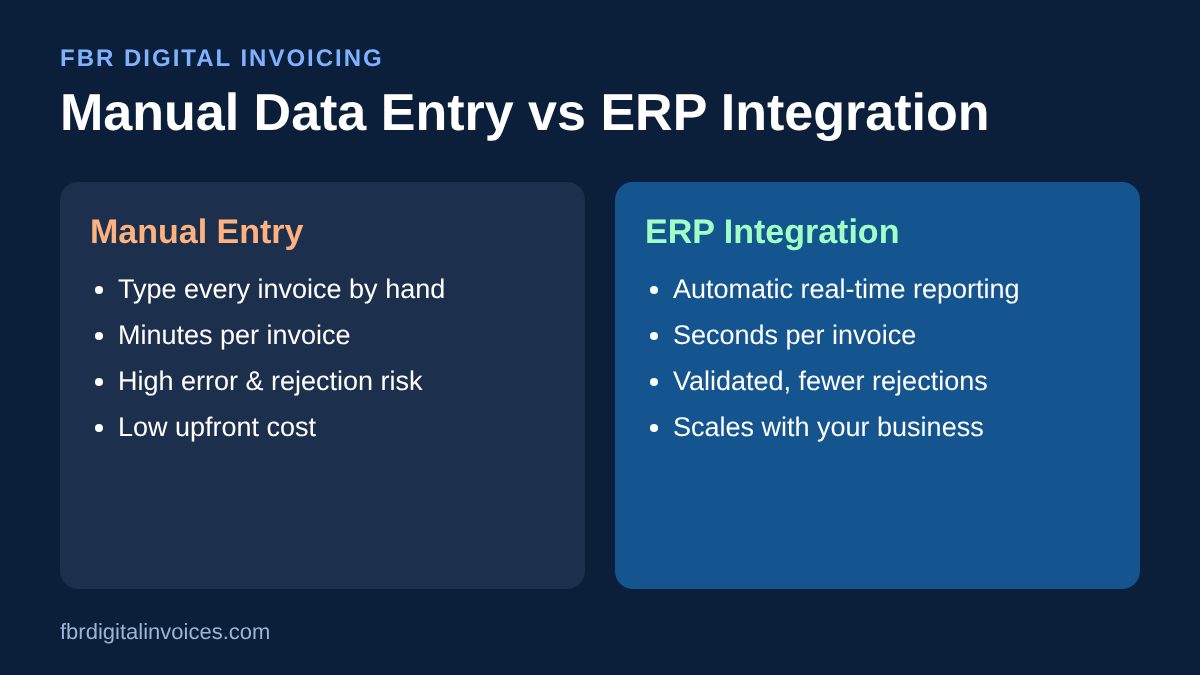
- Manual Data Entry vs ERP Integration: Comparison Table
- 7 Key Differences That Matter
- When Manual Data Entry Is Enough
- When You Should Switch to ERP Integration
- The Middle Option: Excel and PDF Import
- How to Move from Manual Entry to ERP Integration
- Frequently Asked Questions
- Conclusion
Quick Answer: Which Method Should You Use?
If you issue only a handful of sales tax invoices a day and have one person who can enter them carefully, manual data entry can work. If you issue dozens or hundreds of invoices, run multiple branches, or already use an ERP or POS, ERP integration is the safer and cheaper choice over time. It removes re-keying, reduces rejections and reports each invoice to FBR the moment it is created.
What Is Manual Data Entry for FBR Digital Invoicing?
Manual data entry means a person types each invoice into a web portal or a standalone invoicing screen. They fill in buyer details, NTN or CNIC, HS codes, quantities, values and tax, then submit. After FBR accepts the invoice, they copy the FBR invoice number and QR code back onto the invoice given to the customer.
It needs no software project and almost no upfront cost. The trade-off is that every field is typed by hand, often twice: once in your accounting system and again for FBR.
What Is Automated ERP Integration?
With ERP integration, your ERP, accounting software or POS connects to FBR’s digital invoicing system through an API, usually via a licensed integrator. When your team posts a sales invoice as normal, the system validates it, sends it to FBR in real time, receives the FBR invoice number and prints the QR code on the invoice automatically.
Nobody re-types anything. If you want to understand the technical steps, read our guide on how to connect your POS or ERP to FBR.
Manual Data Entry vs ERP Integration: Comparison Table
| Factor | Manual Data Entry | ERP Integration |
|---|---|---|
| Upfront cost | Very low | Integration setup fee |
| Ongoing cost | Staff time on every invoice | Subscription or support fee |
| Speed per invoice | Several minutes | Seconds, automatic |
| Error risk | High: typos, wrong HS codes, wrong tax | Low: data comes from one source |
| Real-time reporting | Depends on staff availability | Built in |
| Scales with volume | No: more invoices need more people | Yes |
| Sales tax return reconciliation | Manual matching, slow | Mostly automatic |
| Best for | Very small, low-volume sellers | Growing businesses, distributors, manufacturers, retailers |
7 Key Differences That Matter
Here is how manual data entry vs ERP integration compares on the factors that affect your daily operations and your FBR compliance.
1. Time Spent per Invoice
Manual entry takes a few minutes per invoice, more when buyer details or HS codes have to be looked up. At 50 invoices a day, that becomes hours of staff time daily. With ERP integration, reporting happens in the background when the invoice is saved.
2. Accuracy and Rejected Invoices
Every hand-typed field is a chance for a mistake: a wrong NTN, a missing HS code, an incorrect tax rate. FBR rejects invalid invoices, and staff then have to find and fix them. Integrated systems validate data before submission. See the common digital invoicing mistakes that trigger FBR notices.
3. Real-Time Compliance
FBR Digital Invoicing is built around real-time reporting. With manual entry, invoices sit in a queue whenever the responsible person is busy, on leave or offline. Integration reports each invoice immediately. Learn more about what FBR sees in real time.
4. Penalty Exposure
Late, missing or mismatched invoices create risk. The Finance Bill 2026 tightened the focus on digital invoicing compliance, which makes avoidable errors more costly. Our breakdown of Finance Bill 2026 digital invoicing penalties explains what is at stake.
5. True Cost Over a Year
Manual entry looks free, but salaries, overtime and error correction add up. ERP integration has a setup cost, yet for most businesses it pays for itself through saved hours. Compare the numbers in our FBR digital invoicing cost breakdown.
6. Sales Tax Return Reconciliation
When invoices are typed twice, your books and FBR’s records can drift apart. Finding those gaps at return time is slow and stressful. With integration, both records come from the same transaction. Read about sales tax return reconciliation with FBR.
7. Scalability
Manual entry grows linearly: double the invoices, double the effort. Integration handles 10 or 10,000 invoices with the same process, across branches and users.
When Manual Data Entry Is Enough
- You issue very few sales tax invoices each day.
- You do not use an ERP, accounting software or POS.
- One trained person can enter invoices promptly every working day.
- Your products use a small, stable set of HS codes and tax rates.
Even then, review the manual data entry vs ERP integration decision every few months. Most businesses outgrow manual entry as volume rises.
When You Should Switch to ERP Integration
- You issue dozens of invoices a day or more.
- You already run an ERP or POS such as Odoo, SAP, QuickBooks or a custom system.
- You have multiple branches, warehouses or billing users.
- You have received FBR notices or rejected invoices.
- Your team spends hours each week re-keying data.
Not sure whether to build it yourself or use a provider? Read in-house integration vs licensed integrator and our guide to the best FBR digital invoicing software in Pakistan.
The Middle Option: Excel and PDF Import
If you are not ready for full ERP integration, invoice import is a practical bridge. You export invoices from your current system as Excel, or upload PDFs, and the platform reads and submits them to FBR. It removes most of the typing without changing your existing software. See how invoice import from Excel and PDF works.
How to Move from Manual Entry to ERP Integration
- Audit your invoices. Count daily volume, list HS codes and tax rates, and note recurring errors.
- Check your software. Confirm whether your ERP or POS can connect through an API or an integrator.
- Clean master data. Fix customer NTN/CNIC records, product HS codes and tax settings first.
- Choose an integration partner. Compare support, security and pricing.
- Test in sandbox. Submit test invoices and confirm FBR invoice numbers and QR codes print correctly.
- Go live and monitor. Watch rejections closely for the first few weeks.
For the full picture, also read how invoice automation saves your team hours every week. Official notifications and updates are published on the Federal Board of Revenue website.
Frequently Asked Questions
Is manual data entry allowed for FBR Digital Invoicing?
Manual entry can be an option for some low-volume taxpayers, but you still have to report each invoice correctly and on time. Check your obligations with our digital invoicing mandatory checklist.
Is ERP integration expensive?
When comparing manual data entry vs ERP integration, remember that manual entry has hidden costs. There is a setup cost, but for businesses with regular invoice volume, saved staff time and fewer rejections usually outweigh it within months.
Can I integrate Odoo or another ERP with FBR?
Yes. Most modern ERP and POS systems, including Odoo, can be connected to FBR Digital Invoicing through an API connector or a licensed integrator.
What happens if a manually entered invoice is wrong?
FBR may reject it, or an accepted invoice with wrong data may cause mismatches in your sales tax return and lead to notices. Learn how to avoid penalties on FBR digital invoices.
Can I start manual and switch to ERP integration later?
Yes. Many businesses start with manual entry or Excel import, then move to full integration as volume grows.
Conclusion
In the choice of manual data entry vs ERP integration, manual entry wins only on upfront cost. For almost every growing business, ERP integration wins on speed, accuracy, real-time compliance and long-term cost. Start by measuring your invoice volume and error rate. If either is rising, it is time to automate.
Ready to stop re-typing invoices? Contact FBR Digital Invoices to connect your ERP or POS to FBR and stay compliant automatically.