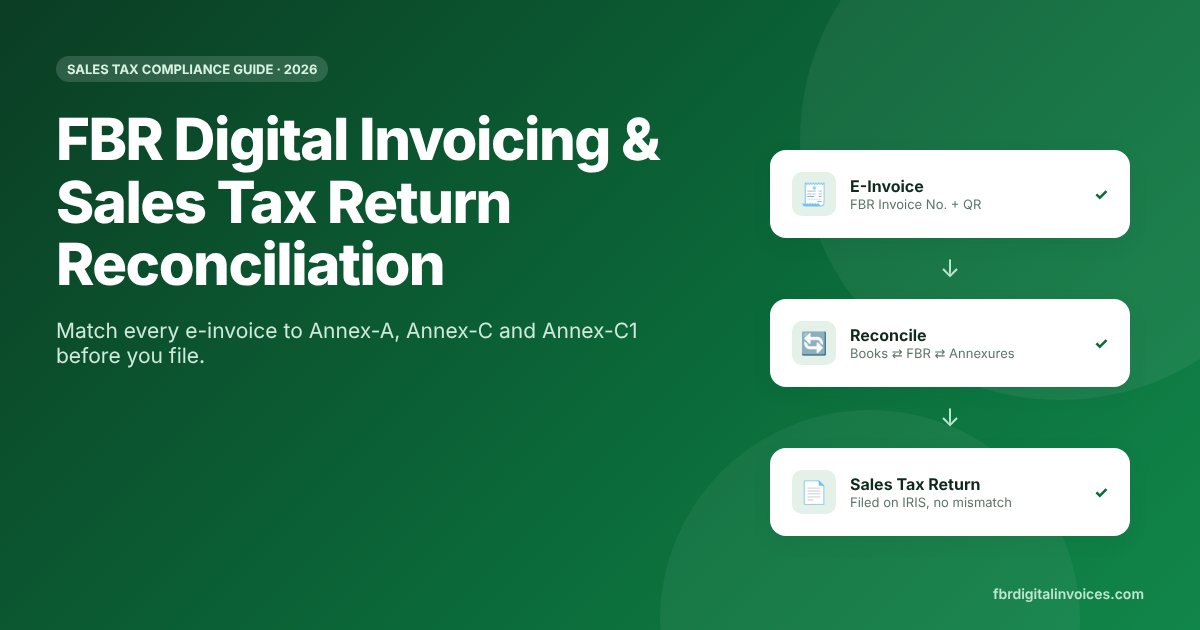
FBR Digital Invoicing has changed how sales tax returns work in Pakistan. Every invoice you issue through an integrated system is reported to FBR in real time and auto-populates your sales tax return. That means your return is only as accurate as your invoices — and any gap between your books, FBR’s records and your suppliers’ filings shows up as a mismatch. This guide explains how sales tax return reconciliation works under FBR Digital Invoicing, and gives you a simple monthly process to file clean returns and protect your input tax.
What Is FBR Digital Invoicing?
FBR Digital Invoicing (e-invoicing) requires sales tax registered persons to issue invoices through software or POS systems integrated with FBR’s computerized system. Under the amended FBR Sales Tax Rules, 2006 (Chapter XIV-AA), every taxable supply needs a real-time, verifiable electronic invoice carrying an FBR-assigned invoice number, a digital signature and a QR code. Debit and credit notes must also be issued electronically through the same integrated system.
Integration is done through PRAL (free of charge) or an FBR-licensed integrator, and registered persons may now engage more than one licensed integrator where needed. Records of e-invoices and notes must be kept for six years.
How E-Invoices Flow Into Your Sales Tax Return
The key change is auto-population. Integrated systems push invoice data to FBR, and that data populates the annexures of your monthly sales tax return on IRIS:
- Annex-C (Domestic Sales): filled from the sales e-invoices you report — this is your output tax.
- Annex-C1 (Payments Received): captures payment received against your domestic sales tax invoices, along with buyer and invoice particulars.
- Annex-A (Domestic Purchases): filled from your suppliers’ reported sales — this drives your input tax claim.
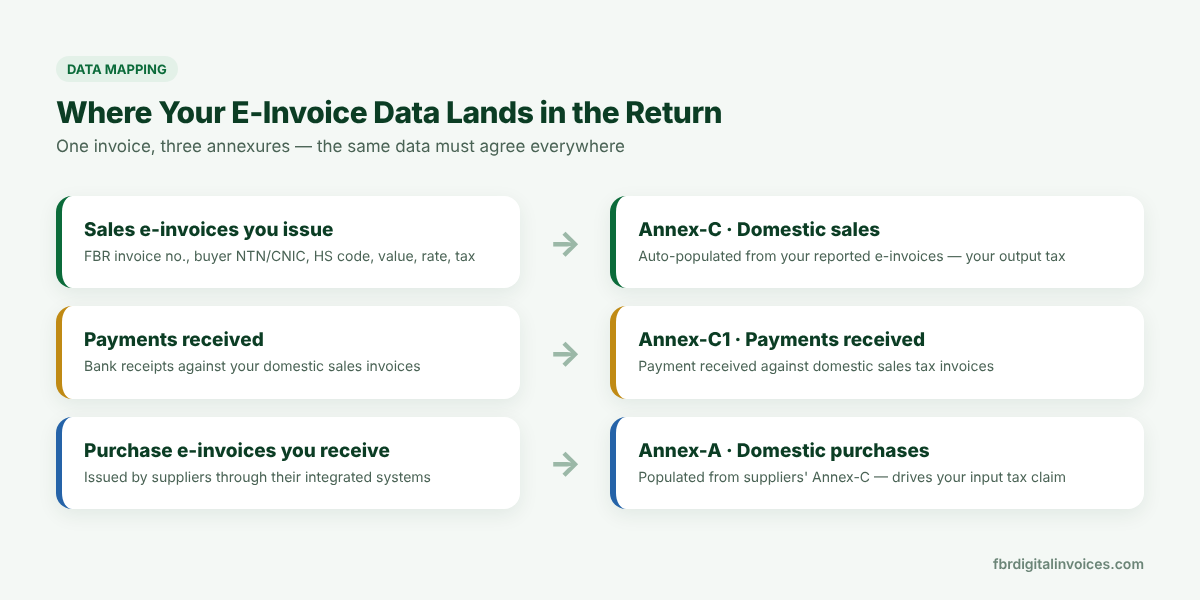
Because Annex-A depends on your suppliers’ reporting, your input tax is only as good as their compliance. If a supplier fails to report an invoice, it won’t appear in your Annex-A — and claiming input tax on it creates a mismatch.
Why Sales Tax Return Reconciliation Matters
Sales tax return reconciliation is the monthly check that your ERP or accounting records agree with what FBR holds. Skipping it leads to:
- Disallowed input tax on purchases your suppliers didn’t report or declare.
- Under-declared output tax when invoices fail to transmit or offline invoices are never uploaded.
- Notices and audits triggered by differences between your return and FBR’s data.
- Penalties and restrictions for non-compliance with e-invoicing rules — see the new Finance Bill 2026 penalties and how to avoid them.
- Cash-flow pressure when blocked input tax raises your payable for the month.
5-Step Sales Tax Return Reconciliation Process
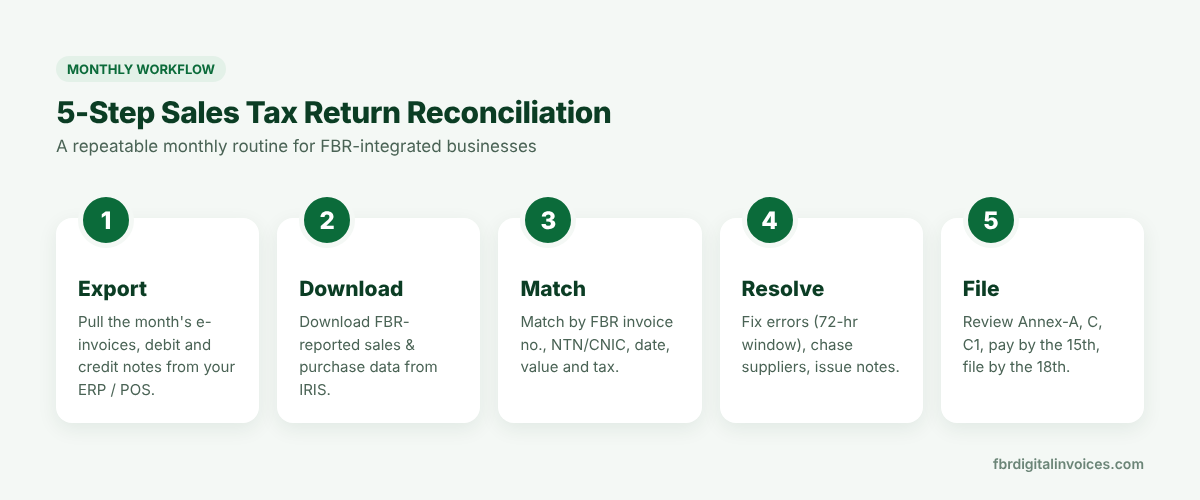
Step 1: Export your records
Export the month’s sales e-invoices, purchase invoices, debit notes and credit notes from your ERP or POS. Include the FBR invoice number, buyer/supplier NTN or CNIC, invoice date, HS code, value excluding tax, rate and sales tax.
Step 2: Download FBR data from IRIS
Download the draft return annexures (Annex-A, Annex-C and Annex-C1) from FBR IRIS so you have FBR’s version of your sales and purchases for the period.
Step 3: Match line by line
Use the FBR invoice number as the primary key, then confirm NTN/CNIC, date, value and tax. Classify every line as matched, in books only, in FBR only or amount difference. A spreadsheet with VLOOKUP/XLOOKUP works for small volumes; larger businesses should automate this in their ERP. To check a single doubtful invoice, verify it on FBR.
Step 4: Resolve the differences
- Your own invoice errors: a valid e-invoice issued by bona fide mistake can be cancelled or edited within 72 hours of issuance (Sales Tax General Order No. 01 of 2026). After that, you need prior approval from the Commissioner Inland Revenue — or correct it with a debit or credit note.
- Offline invoices: invoices issued during a power or internet disruption must be marked offline and uploaded within 24 hours.
- Missing purchases: follow up with suppliers to report the invoice, and hold the input tax claim until it appears in Annex-A.
- Payment gaps: tag bank receipts to FBR invoice numbers so Annex-C1 is complete.
Step 5: Review and file
Review the final annexures, confirm the payable or refundable amount, deposit tax by the 15th and file the return by the 18th of the following month. Save the reconciliation workbook as audit evidence.
Common Mismatches and How to Fix Them
Most mismatches start with avoidable invoicing errors — see our list of common digital invoicing mistakes that trigger FBR notices.
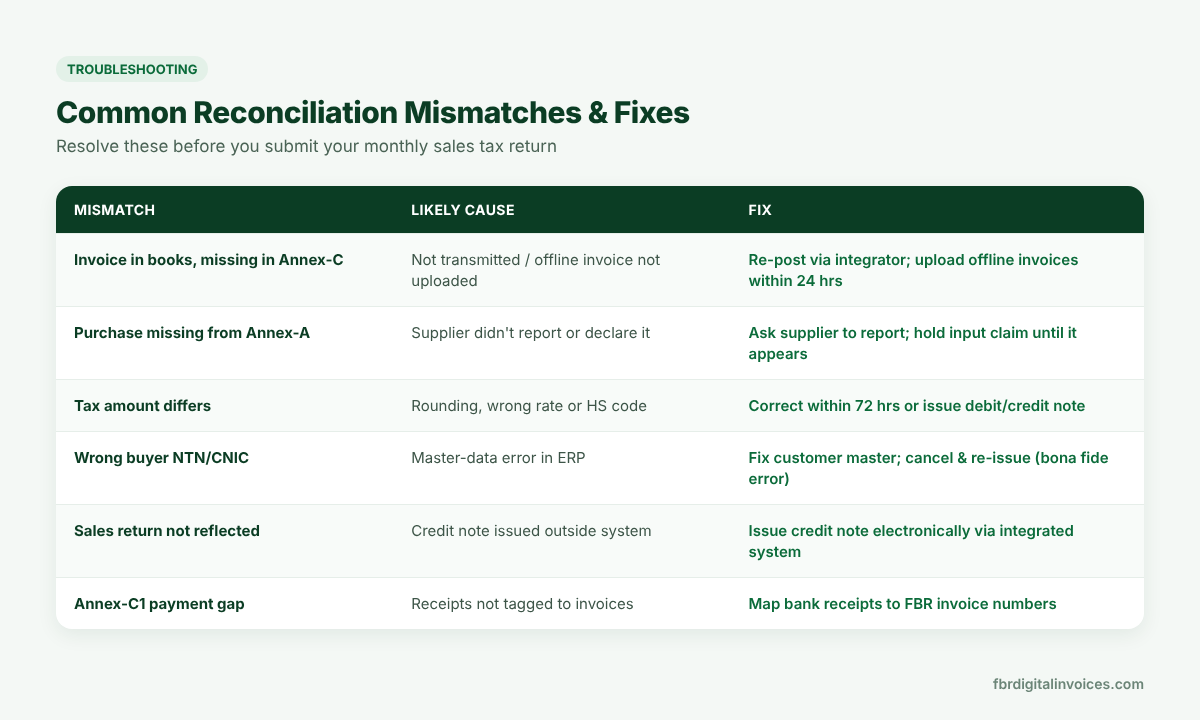
| Mismatch | Likely cause | Fix |
|---|---|---|
| Invoice in books, missing in Annex-C | Not transmitted, or offline invoice not uploaded | Re-post through your integrator; upload offline invoices within 24 hours |
| Purchase missing from Annex-A | Supplier didn’t report or declare it | Ask the supplier to report; hold input tax until it appears |
| Tax amount differs | Rounding, wrong rate or wrong HS code | Correct within 72 hours, or issue a debit/credit note |
| Wrong buyer NTN/CNIC | Customer master-data error | Fix the master record; cancel and re-issue (bona fide error) |
| Sales return not reflected | Credit note issued outside the system | Issue credit notes electronically through the integrated system |
| Annex-C1 payment gap | Receipts not linked to invoices | Map bank receipts to FBR invoice numbers |
Best Practices for Error-Free Returns
- Run sales tax return reconciliation weekly, not monthly. Catching errors inside the 72-hour window avoids Commissioner approvals.
- Clean your master data. Validate customer NTN/CNIC, HS codes and tax rates before invoicing.
- Vet your suppliers. Prefer suppliers who are FBR-integrated and active on the ATL — their compliance is your input tax.
- Never issue paper credit notes. All debit and credit notes must go through the integrated system.
- Monitor integration health. Set alerts for failed API transmissions and report disruptions to the Commissioner within 24 hours.
- Automate matching. Invoice automation and ERP modules (Odoo, SAP, custom Laravel/PHP systems) can pull FBR data and flag mismatches automatically.
Frequently Asked Questions
Is my sales tax return automatically filled by FBR Digital Invoicing?
Partly. E-invoices reported through an integrated system auto-populate the sales and purchase annexures, but you are still responsible for reviewing, reconciling and filing the return.
Can I edit or cancel an FBR e-invoice after issuing it?
Yes, if it was issued by bona fide mistake and you act within 72 hours of issuance. After 72 hours you need prior approval from the concerned Commissioner Inland Revenue, or you can adjust it through an electronic debit or credit note.
Why is my input tax not showing in Annex-A?
Annex-A is built from your suppliers’ reported sales. If a supplier hasn’t reported the invoice or filed their return, it won’t appear. Ask the supplier to report it before you claim the input tax.
What is Annex-C1 in the sales tax return?
Annex-C1 records payments received against your domestic sales tax invoices, along with buyer and invoice details. It was introduced through SRO 578(I)/2025.
When is the sales tax return due in Pakistan?
Sales tax is generally paid by the 15th and the return filed by the 18th of the month following the tax period.
Related Guides
- FBR Digital Invoicing Explained
- FBR Digital Invoicing Deadlines 2026
- How to Connect Your POS or ERP to FBR
- Sales Tax vs. Income Tax in Pakistan
- Best FBR Digital Invoicing Software in Pakistan (2026)
Conclusion
With FBR Digital Invoicing, your sales tax return is built from real-time invoice data — so sales tax return reconciliation is no longer optional. A disciplined monthly routine of exporting, matching, resolving and filing keeps your returns clean, protects your input tax and keeps you audit-ready.
Need help integrating your ERP with FBR or automating reconciliation? Contact our team or see our pricing for FBR Digital Invoicing integration and compliance support.
Disclaimer: This article is for general information only and does not constitute tax or legal advice. Rules change frequently — always confirm with the latest FBR notifications or a qualified tax advisor.